Code, docs, and AI - made visible.
AI agents are a caravan crossing the harsh terrain of development. WYSIWYG Markdown editing with diff review, real-time TypeScript architecture visualization, and a bird's-eye view of every AI session with one-click handoff — three VS Code extensions that serve as your compass in the age of AI.

Why a Camel? — Companionship, not Control.
The horse gallops fast on paved roads but falters against the unknown or heavy context. The camel (AI agents) carries the entire codebase and thinks through sandstorms (errors) where faster tools falter — a long-distance runner. In the caravan, the camel is no beast of burden but a comrade who reads the leader's intent.
The harness dilemma.
The prevailing approach tries to control AI with upfront constraints — whitelists, guardrails, sandboxes, tool restrictions. But the more you constrain it, the more its autonomy and judgment are lost.
Companionship through visibility.
Anytime imposes no constraints. We make actions visible (Trail), artifacts reviewable (Markdown), and the caravan itself surveyable (Agent), building trust through verification both before and after — a philosophy embodied in three extensions.
Editor's note.
This site is an experimental project where design, implementation, and testing are all carried out by Claude Code (an AI coding assistant), with humans only providing instructions. We use Anytime Markdown itself to grasp specifications and verify test content during development. The source code is published on GitHub.
- Draft or revise requirements and specs (AI)
- Approve the spec (human)
- Implementation plan → AI implementation
- Verification → AI review, tests
- Drift detection and reconciliation
Record or correct the deviation, then back to the spec
- Acceptance testing (human)
- Production release
- Health analysis and incident detection
- Accept or reject the proposal (human)
Adopted proposals become spec revisions
Trail detects the drift between hoofprints and map, and the map — the spec — is redrawn
 Anytime Agent — survey the caravan— shipped
Makes visible the camels in the illustration — the AI sessions. See every Claude Code session at a glance and hand work off with its context intact, without stopping loop A.
 Anytime Trail — record the tracks, detect the drift— shipped
Records the hoofprints: what actually ran. It reconciles the code graph against the specs to detect drift, backing the verification in loop A and the health analysis in loop C.
 Anytime Markdown — write the spec, make it reviewable— shipped
Draws the map — the spec. An editor with diagrams, tables, and diffs shapes AI output into something a human can approve. The entrance to loop A.
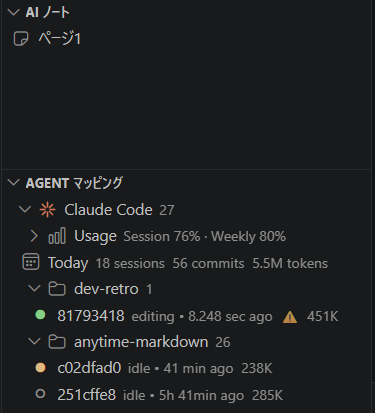
- iSurvey every Claude Code session — Agent mapping— shipped
List all Claude Code sessions ordered by recent activity. Inspect branch, worktree, commit count, and context warnings on hover, and spot bloated sessions instantly via the ⚠️ badge.
- iiSwitch without losing context — Session handoff— shipped
Migrate a bloated session to a fresh one along with a compressed summary. Launch a new claude session in the terminal with the handoff auto-injected, continuing work without losing context.
- iiiHand visual information to the AI — AI notes— shipped
Share images, tables, and free-form memos with AI tools that cannot see the screen. The bundled anytime-note skill lets the AI read note pages on request and act on the visual information.
- iGrasp Project Quality — quality visualization— shipped
Track error counts, retry rates, build/test failure rates, and compact-loop occurrences per session. Quantify AI agent work quality and quickly detect repeated failures or inefficient editing patterns. Undertested modules are also overlaid on the C4 diagram for at-a-glance review.
- iiRecord Every AI Action — behavior visualization— shipped
Visualize user input, AI responses, and tool executions turn by turn as a hierarchical tree, with tool call parameters and results in expandable nodes. A conversation tree synced with the turn timeline lets you trace exactly what the AI agent decided, when, and why.
- iiiOptimize Costs — productivity visualization— shipped
Monitor total token consumption, estimated cost, and cache hit rate over time, with output ratio and context-growth signals at a glance. Productivity metrics per commit, per hour, and per line let you quantify AI agent ROI.
- ivTrack DevOps Metrics — quality visualization— shipped
Automatically measure lead time, deployment frequency, change failure rate, and release success rate. Quantify Four Keys-based delivery performance and accelerate continuous improvement with the release bar chart and DORA scorecards.
- iRecord Every AI Action — behavior visualization— shipped
Visualize user input, AI responses, and tool executions turn by turn as a hierarchical tree, with tool call parameters and results in expandable nodes. A conversation tree synced with the turn timeline lets you trace exactly what the AI agent decided, when, and why.
- iiTrack Sub-agent Delegation — delegation structure visualization— shipped
Visualize Task-tool sub-agent invocations on dedicated tracks along the timeline. See parallel execution, duration, and outcomes of delegated tasks at a glance — and verify exactly which decisions were entrusted to which agent.
- iMap the codebase — structure visualization— shipped
Analyze TypeScript projects to auto-generate C4 architecture diagrams and DSM (Dependency Structure Matrix). Drill down from system overview to individual files across four levels (L1–L4), with circular dependencies highlighted in red at a glance.
- iiGrasp Architecture Quality — quality visualization— shipped
Overlay test coverage, complexity, defect risk, and hotspot heatmaps onto the C4 diagram. Locate quality weaknesses in their structural context and instantly judge refactoring priorities.
- iiiTrack AI Activity in Structure — behavior visualization— shipped
Track in real time which C4 modules Claude Code agents are editing right now. Multi-agent parallel work is also visualized via multi-agent lanes, letting you grasp work concentration and collisions within the structure.
- ivTrack Inter-release Structural Change — drift visualization— shipped
Select releases to compare coverage diffs and dependency changes, detecting architectural decay structurally. Identify drifting areas and repair gaps between design and implementation early.
- vDiscover Implementation Communities — cohesion visualization— shipped
Overlay Louvain-detected implementation communities onto the C4 diagram to surface gaps between designed boundaries and observed cohesion. Propose refactoring candidates and boundary redesigns grounded in structure.
- 01Replay AI Behavior on the Time Axis — time scrubber visualization— planned
Rewind graphs, commits, and edits to any point during a session. Replay the AI agent's decision sequence and reproduce the context just before an error or the progression of a refactor over time.
- 02Discover Temporally Coupled Code — hidden dependency visualization— shipped
Extract file pairs frequently co-edited within a time window and overlay them on the C4 diagram as ghost edges. Surface hidden logical coupling that doesn't appear in the designed dependency graph and inform refactoring decisions.
- 03Prevent Concurrent Agent Collisions — air-space separation— partial
Agents submit a flight plan (work scope) up front, and the control tower detects scope breaches or parallel edits on the same file. Run multiple AI agents simultaneously without destructive overwrites or contradictory commits.
- 04Minimum Risk Maneuver on Anomaly — emergency stop protocol— partial
When unexpected errors, cost overruns, or destructive operations are detected, the aircraft autonomously triggers an MRM (Minimum Risk Maneuver) to move to a safe state. The control tower contains the blast radius by rerouting other aircraft.
- 05Multi-layer Defense for Persistent Data — preventing data destruction incidents— partial
A five-layer defense — type signatures, implementation conventions, test conventions, pre-commit hooks, and runtime monitoring — blocks unintended writes to user storage at every stage. Structurally prevent AI-induced data destruction incidents.
- 06Progressive Autonomy — flight-level gating— planned
Measure AI autonomy across four levels — L1 (manual approval), L2 (conditional autonomy), L3 (autonomy within ODD), L4 (full autonomy). Promote levels through gates as project maturity grows, raising autonomy safely.
- 07Autonomous Approval Within ODD — operational domain policy— planned
Within the Operational Design Domain (a predefined work scope), the AI proceeds with autonomous approval; the control tower is consulted only on scope breaches. Speed safe work through and focus human review on changes that need attention.
- 08Redundant Verification by Multiple Agents — second opinion visualization— planned
Delegate critical decisions to multiple AI agents in parallel and visualize consensus or divergence. Cancel out one aircraft's bias or hallucination with another's perspective and structurally raise decision reliability.
- 09Predict Defects from Past Patterns — defect prediction visualization— shipped
Score likely future defect locations from past defect patterns, complexity, and change frequency. Overlay them on the C4 diagram as a risk map and prioritize testing and review based on structural signals.
- 10Discover Unused Code — Dead Code detection— shipped
Extract code with no access or edits over a time window from time-axis data and mark Dead Code candidates. Surface implementations that can be safely removed, grounded in cross-release behavioral data.
- 11Manage Knowledge Generations — graph versioning visualization— shipped
Store generations of the C4 model and code graph per release, allowing the structure at any point in time to be restored. Trace the evolution of design intent and reproduce when, why, and by whom the structure was changed.
- 12Surface Where Knowledge Lives — knowledge distribution visualization— planned
Infer from edit history which agents are familiar with which modules and topics, surfacing imbalances and blank spots in knowledge distribution. Useful for choosing review targets and detecting bus-factor risk areas early.
- 13Self-update from Experience — autonomous learning loop— planned
Visualize the loop in which the AI updates its policy autonomously from success and failure experiences. The Memory Shrink Guard prevents inadvertent shrinkage of the learning base, accumulating knowledge assets over the long run.
- 14Trace Runtime Calls — dynamic behavior visualization— planned
Reconstruct span waterfalls, edge traversal order, and call flow on the graph from execution traces. Overlaying runtime paths and execution frequency onto static dependencies surfaces hotspots and divergence between the two.
- 15Self-detect Degraded Judgment — self-diagnostics— planned
Continuously aggregate tool failure rates, repeated responses, and context saturation so the AI itself detects declining judgment quality from hallucination or an oversaturated context. Contradictions and staleness across skills and memory are checked alongside, and degradation is reported to the control tower.
- 16Detect Design–Implementation Divergence — structural drift visualization— planned
Advance the community overlay from visual inspection to automatic judgment: divergence from the C4 logical boundaries is detected mechanically and raised as drift. Runtime reachability corroborates each finding, indicating whether the design or the implementation should change.
- iPreview docs and diagrams in VS Code— shipped
Instantly preview AI-generated Markdown in WYSIWYG. Mermaid, PlantUML, and math (KaTeX) render directly in the editor — no context switching needed.
- iiReview AI's footprints. Lock what's done.— shipped
AI-edited sections are color-highlighted for instant diff comparison. Lock finalized sections to prevent AI from re-editing them.
- iiiInstant 3-mode switching— shipped
Switch between WYSIWYG, Source, and Review modes with a single click. Review mode is read-only — perfect for focused review of AI output.
Faster tools lead writers astray. We carry words at the caravan's pace.
Latest Reports
GitHub Trending
via GitHubKaido Map
travel.anytime-trial.comThe preview is display-only — open the app to move the map.
A map app for tracing nine old Japanese highways — the Tokaido, the Nakasendo, the Kumano Kodo and more — with post towns, milestones and an elevation profile. Built to read the terrain and the spacing of a road, not the distance you walked.
- Nine highways
- Tokaido, Nakasendo, Kyokaido, Saigoku Kaido, the three Koya routes, and the Kiiji and Nakahechi of the Kumano Kodo. The Tokaido lists all fifty-three post towns with the distance between each.
- Elevation profile
- Terrain drawn from the Geospatial Information Authority of Japan elevation tiles (DEM10B), with post towns laid over it. Press play and distance and elevation advance along the road.
- Panorama and photo map
- Alongside the map, a photo map that drops your pictures onto the route, and a panorama gallery opened with a passphrase.
Elevation: GSI elevation tiles (DEM10B) / Route: © OpenStreetMap contributors (ODbL)